-
Shop
- Advanced Technologies
- AI Career Advantage Collection
- AI Skills Mastery 2026 Collection
- Arts, Crafts & Hobbies
- Bathroom
- Best-Sellers
- Car Accessories
- Dating & Social Skills
- Denim
- 7FOR
- AGOLDE
- Antony Morato
- Armani Exchange
- Boss
- Brunello Cucinelli
- Calvin Klein Jeans
- Costume National
- Desigual
- Diesel
- Dolce & Gabbana
- Dsquared²
- Ermanno Scervino
- Fendi
- Gianni Lupo
- Guess Jeans
- Ichi
- Just Cavalli
- Lee
- Levi's
- Liu Jo
- Morgan De Toi
- Mother Denim
- Only
- Pepe Jeans
- Pinko
- Replay
- Valentino
- Vero Moda
- Digital Resources
- Education & Learning
- Family & Parenting
- Fashion
- Furniture
- Gadgets
- Health & Beauty
- Health & Wellness
- Home & Garden
- Kids & Babies
- Kitchen
- Lighting
- Patio, Lawn & Garden
- Personal Growth
- Pet Care
- Pet Supplies
- Pets
- Sport & Outdoors
- TikTok Growth & Monetization Mastery
- Travel
- Wealth
- Popular
- Best deals
Rechargeable RGB Honeycomb Mouse: Wireless, Light, Fast
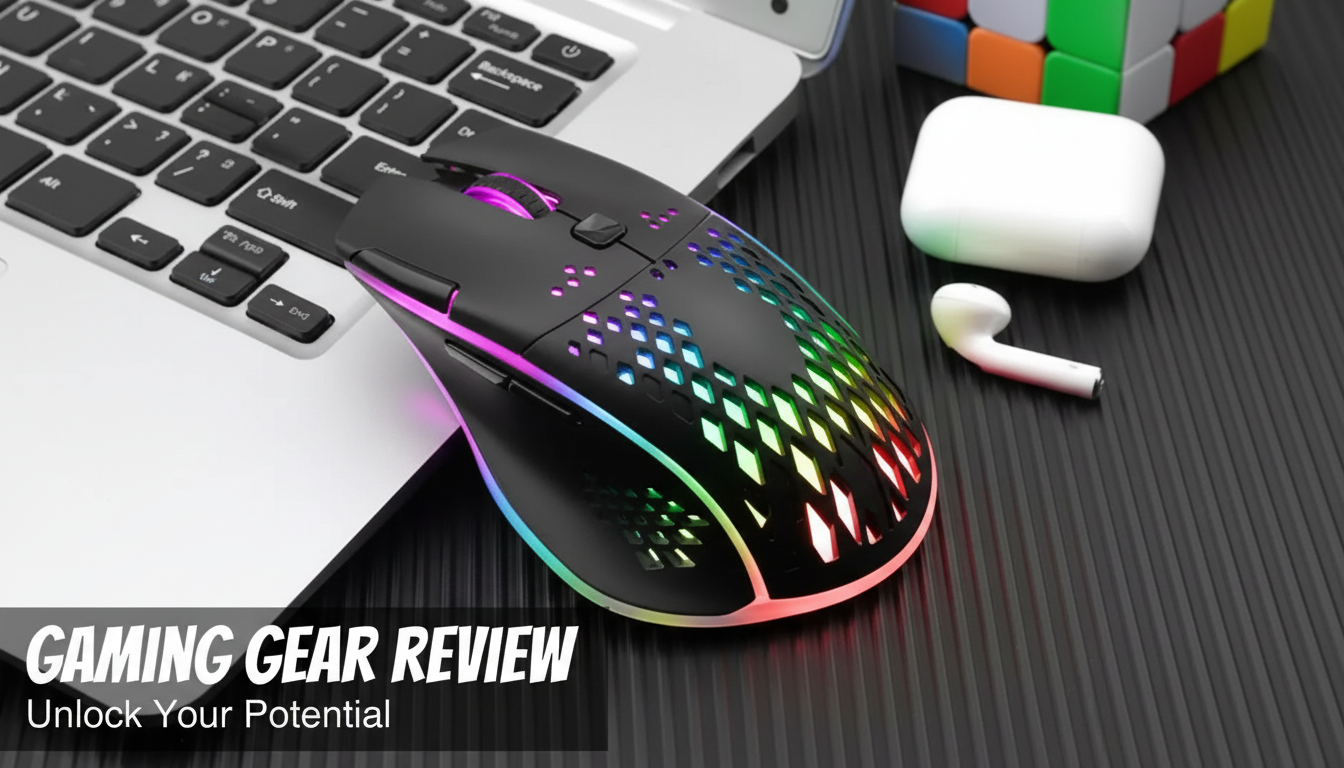
Rechargeable RGB Wireless Honeycomb Gaming Mouse: Lightweight Control Without the Cable
A honeycomb shell can reduce weight while keeping grip stable, and a rechargeable wireless design keeps the desk clean. This guide focuses on what matters most for everyday play—comfort, responsiveness, lighting, battery habits, and setup—so the mouse feels predictable in fast matches and reliable for work sessions.
What Makes a Honeycomb Gaming Mouse Different
Honeycomb gaming mice stand out because the shell uses cutouts to trim weight without removing the core structure you rely on for control. For many players, less weight makes quick starts and stops feel more natural, especially when aiming requires repeated micro-adjustments.
- Honeycomb cutouts are designed to reduce overall weight, which can help with quicker starts and stops during aiming.
- A lighter mouse can reduce wrist fatigue during long sessions, especially for lower-sensitivity players who move the mouse farther.
- The open shell can feel cooler in warm rooms; it may also collect dust faster than closed-body designs.
- Grip comfort depends on hand size and grip style (palm, claw, fingertip); honeycomb mice often suit claw and fingertip grips well.
If your hands run warm, the open design can feel less sweaty over time. The tradeoff is upkeep: dust and debris can settle into the cutouts, so a quick wipe-down (and occasional gentle cleaning around the sensor area) helps keep the feel consistent.
Wireless Performance Basics That Matter in Games
Wireless gaming has matured to the point where a stable connection is usually the deciding factor—not chasing flashy numbers. What you want is consistent tracking and button response so your crosshair doesn’t “skip” during flicks or rapid strafes.
- Stable wireless connection is more important than peak specs; consistent tracking avoids “micro-stutters” during flicks.
- A dedicated wireless receiver typically provides more consistent performance than generic Bluetooth for competitive play (when both are available).
- Keep the receiver close to the mouse (front USB port or a short extender) to reduce interference from the PC case and other devices.
- Turn off unused wireless devices nearby if occasional input drops occur (controllers, older Wi‑Fi adapters, USB 3.0 hubs).
Quick checks for a smoother wireless setup
| Issue | What to try | Why it helps |
|---|---|---|
| Cursor feels uneven | Move receiver closer (front port or extender) | Improves signal strength and stability |
| Random disconnects | Charge fully, then test again | Low battery can reduce wireless reliability |
| Lag spikes near other devices | Separate from USB 3.0 hubs / routers | Reduces electromagnetic interference |
| Tracking feels off | Clean the sensor lens area gently | Dust can affect sensor accuracy |
For deeper context on how tracking performance is evaluated, RTINGS provides a helpful overview of sensor testing methodology and accuracy considerations: https://www.rtings.com/mouse/tests/control/sensor-accuracy.
Rechargeable Battery and Daily Charging Habits
Rechargeable mice are easiest to live with when charging becomes routine rather than reactive. Instead of waiting for a near-empty warning during a match, aim for small, predictable top-ups—similar to how many people manage phone charging.
- Rechargeable mice are best treated like phones: short top-ups are fine; full cycles are not required every time.
- A consistent charging routine (for example, during meals or breaks) helps avoid running out mid-match.
- If lighting effects are enabled, battery runtime can drop; use a static color or lower brightness for longer sessions.
- Avoid storing the mouse fully drained for long periods; partial charge is better for battery health.
If you travel with a laptop, keeping a short charging cable in the same pouch as your receiver can prevent the “forgot to charge” moment and lets you switch to charging during downtime without reorganizing your setup.
RGB Lighting: Looks, Visibility, and Battery Tradeoffs
Fit, Buttons, and Glide: Comfort Over Time
If you’re unsure about your grip type, SteelSeries has a clear breakdown of palm, claw, and fingertip styles that can help you predict how a honeycomb shape might feel: https://steelseries.com/blog/mouse-grip-styles-116.
Setup Checklist for PC and Laptop
For Windows settings help, Logitech’s guide explains how to disable pointer acceleration (Enhanced Pointer Precision) for more consistent motion: https://support.logi.com/hc/en-us/articles/360023179974-Disable-Mouse-Acceleration-in-Windows.
Product Snapshot: Rechargeable RGB Wireless Honeycomb Gaming Mouse
If you’re moving from a basic office mouse and want a lighter, more agile feel without adding cable drag to your desk, the Rechargeable RGB Wireless Honeycomb Gaming Mouse is built around the essentials: a honeycomb-style body for reduced weight, rechargeable convenience, and RGB lighting you can tailor to your space.
At-a-glance details
| Item | Details |
|---|---|
| Product | Rechargeable RGB Wireless Honeycomb Gaming Mouse |
| Price | $21.51 USD |
| Availability | In stock |
| Product page | https://fatelle.com/rechargeable-rgb-wireless-honeycomb-gaming-mouse/ |
More In-Stock Picks
- Ready for Winter Ready for Anything – Winter Sport Gear Basics eBook
- Cozy Cuddly Cowboy Bear Plush Toy – Soft Hugging Companion
- Ichi Women’s Grey Cotton Stretch Jeans
FAQ
Does a honeycomb mouse feel uncomfortable during long sessions?
Comfort depends on your grip style and how sensitive your hand is to texture. Many players find the honeycomb shell breathable and easy to control, and grip tape can help if the cutouts feel distracting. Keeping the shell clean also prevents debris from making edges feel rough.
Will RGB lighting reduce battery life on a rechargeable mouse?
Yes—higher brightness and animated effects typically use more power. For longer runtime, try a static color, reduce brightness, or turn RGB off when you don’t need it.
How can wireless lag be reduced when gaming?
Place the receiver closer to the mouse (front USB port or an extender), keep the mouse charged, and avoid nearby interference from USB 3.0 hubs or routers. If tracking still feels inconsistent, gently clean around the sensor area.
Recommended for you

Stop Car Rust: Remove, Repair, and Protect for Years
May 31, 2026
How to Style Beige Trousers: Baldinini Trend Guide
May 31, 2026












Leave a comment